Error Code 277 in Roblox is a connection error that appears when Roblox loses connection to the game server. It usually shows up while joining a Roblox experience or during gameplay, often with a message like “Lost connection to the game server, please reconnect” or “Please check your internet connection and try again.”
Roblox’s official support page explains that Error Code 277 in Roblox happens when the Roblox client fails to establish or maintain a network connection on PC, Mac, or mobile devices. In simple terms, it means your game has disconnected from the Roblox server.
In simple words, Roblox Error Code 277 means your game has disconnected from the server.
What Does Error Code 277 Mean in Roblox?
Error Code 277 means Roblox could not keep your device connected to the game server. This can happen because of your internet connection, Roblox server issues, a bug inside the specific game you are playing, corrupted Roblox files, or network restrictions from your firewall, antivirus, VPN, or router.
This error is usually not related to your account being banned. Roblox lists Error Code 267 as the error connected to being banned or kicked from an experience, while Error Code 277 is listed as a lost connection error.
Common Roblox Error Code 277 Message
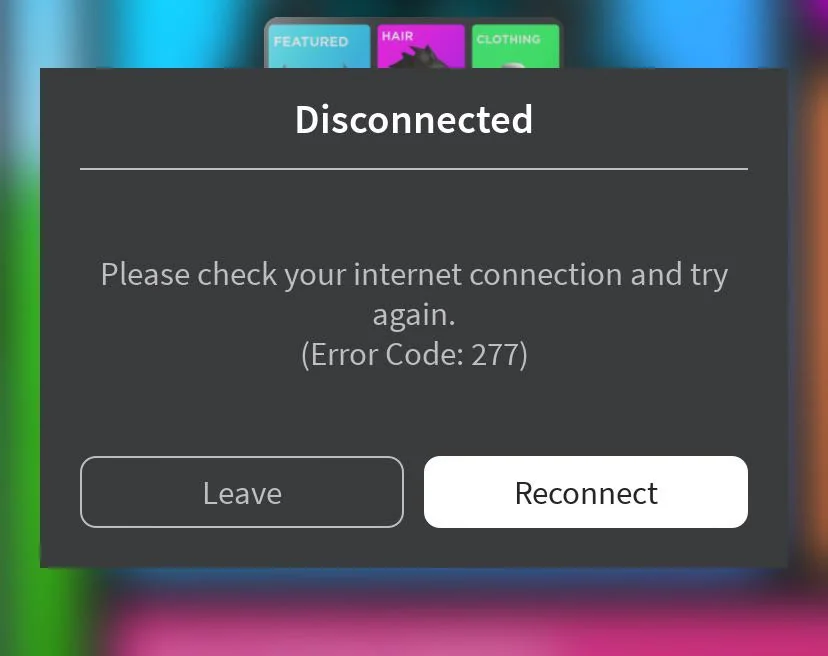
Players may see a message like this:
Disconnected. Lost connection to the game server, please reconnect. Please check your internet connection and try again. Error Code: 277
The exact wording may be slightly different depending on your device, Roblox version, or the platform you are using.
Main Causes of Roblox Error Code 277
There is no single reason why Error Code 277 appears. It can happen because of a problem on your side, Roblox’s side, or the specific game server you are trying to join.
1. Weak or Unstable Internet Connection
The most common cause of Roblox Error Code 277 is an unstable internet connection. If your Wi-Fi drops for a few seconds, your ping becomes too high, or your connection keeps switching between networks, Roblox may disconnect you from the server.
This is especially common if you are playing on weak Wi-Fi, mobile data, public Wi-Fi, or a crowded home network.
2. Roblox Server Problems
Sometimes the issue is not your device. Roblox servers may be experiencing downtime, maintenance, or temporary connection problems. Roblox has an official status page where users can check active incidents and upcoming maintenance.
If Roblox is down, you may not be able to fix Error Code 277 from your side. In that case, the best option is to wait until Roblox resolves the issue.
3. Problem With a Specific Roblox Game
If Error Code 277 happens only in one Roblox experience, the issue may be with that specific game. Roblox’s general connection help page says connection problems can happen because of a bad experience, bad scripts, too many objects, or a game that is not running properly.
To test this, try joining a different Roblox game. If other games work fine, the problem is likely with that one experience.
If the issue happens only in one server or experience, you can also try joining a different server. For more help, read our guide on how to join private servers in Roblox.
4. Corrupted Roblox Files or Cache
Roblox files can sometimes become corrupted or outdated. This may cause loading problems, crashes, or connection errors. Roblox recommends uninstalling and reinstalling the Roblox application for Error Code 277 because a fresh install can clear corrupted files and update the app to the latest version.
5. Firewall, Antivirus, or Router Restrictions
Your firewall, antivirus, router, or security software may block Roblox from connecting properly. Roblox’s connection help page says firewall issues are a frequent cause of connection problems. It also recommends checking browser security settings, firewall settings, and router settings if Roblox cannot connect properly.
6. VPN or Proxy Interference
VPNs and proxy services can sometimes cause connection instability in Roblox. They may increase ping, change your server route, or interrupt the connection between Roblox and the game server.
If you are using a VPN and keep seeing Error Code 277, turn it off and try joining Roblox again.
7. Outdated App or Device Issue
Roblox may also disconnect if the app is outdated, your device has temporary memory issues, or your system time is incorrect. Roblox’s official Error Code 277 guide recommends rebooting mobile devices, force-closing the Roblox app, reinstalling Roblox, and checking date and time settings on iOS and Android.
How to Fix Roblox Error Code 277
Try these fixes in order. Start with the easiest steps before moving to advanced solutions.
1. Check Roblox Server Status
Before changing your device settings, check whether Roblox is having server issues. Visit the official Roblox Status page and look for active incidents or maintenance. If Roblox is down, wait and try again later.
2. Restart Roblox
Close Roblox completely and open it again. If you are on PC, make sure Roblox is not still running in the background. If you are on mobile, force close the app and relaunch it.
This simple step can fix temporary connection glitches.
3. Restart Your Device
Restart your PC, phone, tablet, or console. Roblox recommends rebooting mobile devices as one of the official troubleshooting steps for Error Code 277.
A restart clears temporary memory problems and refreshes your device connection.
4. Restart Your Router
Turn off your Wi-Fi router, wait around 30 seconds, and turn it back on. After the router reconnects, open Roblox and try joining the game again.
This can help if your internet connection was unstable or your router was causing packet loss.
5. Switch to a More Stable Internet Connection
If you are using Wi-Fi, move closer to the router. If possible, use a wired Ethernet connection on PC or console. Roblox’s general connection guide recommends checking wireless connection issues and switching to a wired connection when possible.
If you are on mobile data, switch to Wi-Fi and test again.
6. Try a Different Roblox Game
Join another Roblox experience. If the second game works normally, the problem may be with the first game’s server or script. If every Roblox game shows Error Code 277, the issue is more likely related to your internet, Roblox installation, device, firewall, or Roblox servers.
If you are still learning how Roblox works across different devices, our guide on how to play Roblox on PC, mobile, and console can help you understand the basic setup before troubleshooting deeper connection problems.
7. Disable VPN or Proxy
Turn off your VPN, proxy, or gaming network booster and reopen Roblox. If Roblox works after disabling the VPN, your VPN connection was likely causing the problem.
For the best Roblox connection, use your normal home internet without unnecessary VPN routing.
8. Clear Roblox App Data on Windows
On Windows, Roblox recommends clearing app data as part of its Error Code 277 troubleshooting. The official guide explains that clearing app data can remove cache buildup and restore Roblox to its default state.
Basic steps:
- Uninstall Roblox
- Press Windows + R
- Type
cmdand press Enter - Type
cd AppData\Localand press Enter - Type
rmdir /s Robloxand press Enter - Type
ywhen asked to confirm - Restart your PC
- Reinstall Roblox
Only follow command prompt steps if you are comfortable using Windows commands.
9. Reinstall Roblox
If restarting and network fixes do not work, uninstall and reinstall Roblox. Roblox recommends reinstalling the application for Error Code 277 on Windows, Mac, iOS, and Android.
A fresh install can fix corrupted files, outdated app data, and broken Roblox components.
10. Check Firewall and Antivirus Settings
If you play Roblox on PC, make sure your firewall or antivirus is not blocking Roblox. Roblox’s general connection guide says antivirus and internet security software may block programs from accessing the internet by default.
Add Roblox as an allowed app in Windows Firewall or your antivirus software, then try again.
Error Code 277 vs Error Code 279 in Roblox
| Roblox Error Code | Meaning | Common Cause |
|---|---|---|
| Error Code 277 | Lost connection to the game server | Internet drop, unstable connection, server issue, corrupted files |
| Error Code 279 | Failed to connect to the game | Firewall, blocked connection, slow internet, browser/network issue |
| Error Code 267 | Banned or kicked from an experience | Game moderation, script kick, experience-specific restriction |
| Error Code 280 | Roblox version may be out of date | Outdated Roblox app |
Roblox’s official error code list separates these errors, so Error Code 277 should mainly be treated as a connection issue, not a ban or account problem.
How to Prevent Roblox Error Code 277
You may not be able to prevent Error Code 277 every time, especially if Roblox servers or a specific game server are having problems. But you can reduce the chances of getting disconnected.
Use these tips:
- Play on a stable Wi-Fi or Ethernet connection
- Avoid switching networks while playing
- Keep Roblox updated
- Restart your router regularly
- Avoid VPNs while playing Roblox
- Close background apps that use internet bandwidth
- Make sure Roblox is allowed through your firewall
- Reinstall Roblox if the problem keeps coming back
- Check Roblox Status before troubleshooting too much
- Try another game if only one Roblox experience keeps disconnecting
Final Answer
Roblox Error Code 277 means Roblox lost connection to the game server. It usually happens because of unstable internet, Roblox server issues, a problem with a specific game server, corrupted Roblox files, VPN interference, or firewall restrictions.
The fastest fixes are to restart Roblox, check Roblox server status, restart your router, switch to a better internet connection, disable VPN, clear Roblox app data, update Roblox, or reinstall the app.
If Error Code 277 happens in only one game, the problem may be with that Roblox experience. If it happens in every game, focus on your internet connection, device, firewall, or Roblox installation.
What is Error Code 277 in Roblox?
Error Code 277 in Roblox means the game lost connection to the server. Roblox officially describes it as a connection issue where the client fails to establish or maintain a network connection.
Is Roblox Error Code 277 a ban?
No. Error Code 277 is usually not a ban. It is a lost connection error. Roblox lists Error Code 267 as the error related to being banned or kicked from an experience.
Why do I keep getting Error Code 277 in Roblox?
You may keep getting Error Code 277 because of weak Wi-Fi, high ping, Roblox server issues, corrupted app files, VPN interference, firewall restrictions, or a broken game server.
How do I fix Roblox Error Code 277?
Restart Roblox, restart your device, check Roblox server status, restart your router, disable VPN, switch to a stable internet connection, clear Roblox app data, and reinstall Roblox if needed.
Can Roblox servers cause Error Code 277?
Yes. If Roblox servers are down or having issues, players may see connection errors. You can check the official Roblox Status page for active incidents or maintenance.
Why does Error Code 277 happen in only one Roblox game?
If Error Code 277 happens in only one game, that experience may have a server issue, bad script, or performance problem. Try joining another Roblox game to confirm.
Can a VPN cause Roblox Error Code 277?
Yes. A VPN or proxy can interfere with Roblox’s connection and may cause disconnections. Turn off the VPN and try joining Roblox again.
Should I reinstall Roblox to fix Error Code 277?
Yes, but only after trying easier fixes first. Roblox recommends reinstalling the app because it can clear corrupted files and install the latest version.
For parents who are troubleshooting Roblox for a child’s account, we also have a complete guide on whether Roblox is safe for kids and what settings parents should check first.