Android 17 is not just another yearly Android update. This time, Google is using the release to tighten the weak points attackers usually target first: scam calls, malicious apps, stolen phones, location access, contact permissions, one-time passwords, and even unofficial Android builds.
The bigger security push became clearer around Google’s latest Android security announcements for 2026, where the company detailed new protections for banking calls, Live Threat Detection, Chrome APK downloads, Advanced Protection, theft protection, location privacy, contact sharing, OS verification, OTP protection, 2G safeguards, and post-quantum cryptography.
Android 17 Beta 1 arrived on February 13, 2026, Beta 3 reached Platform Stability on March 26, 2026, and Beta 4 was released on April 16, 2026 as the last scheduled beta. That means the security picture is now much clearer than it was at the start of testing.
Here are the 12 biggest Android 17 security and privacy upgrades, what each one actually does, and why they make your phone genuinely harder to compromise.
- Android Will Now Automatically End Fake Banking Calls – Before You Pick Up
- Live Threat Detection Gets a Significant Upgrade
- Chrome on Android Will Scan APK Files Before You Download Them
- Advanced Protection Mode Is Becoming Much More Restrictive
- Mark as Lost Gets a Critical New Layer: Biometric Lock
- Theft Protection Features Are Now On by Default, Globally
- Brute Force PIN Attacks Are Getting Harder to Pull Off
- You Can Now Share Your Precise Location Temporarily
- The Location Indicator Is Now Harder to Miss
- Apps Will Only See the Contacts You Actually Choose to Share
- Android Will Now Verify Whether Your OS Build Is Legitimate
- OTP Theft Is Getting Blocked, and Quantum-Era Threats Are Already on Google’s Radar
- Conclusion
Android Will Now Automatically End Fake Banking Calls – Before You Pick Up
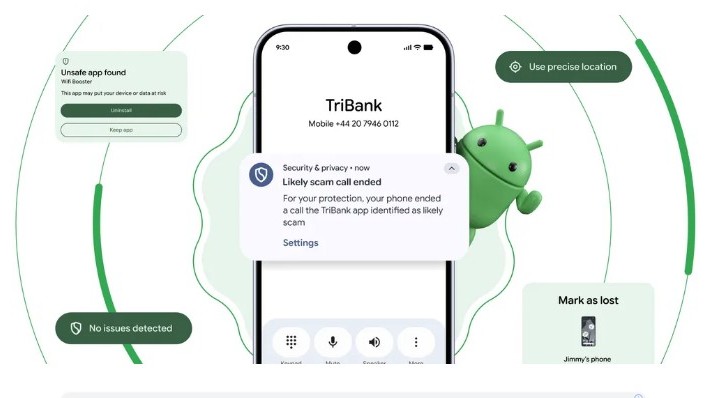
This one is long overdue. Google is rolling out Verified Financial Calls, a new Android protection designed to stop scammers who spoof bank numbers and pretend to be your financial institution.
Instead of asking you to guess whether the call is real, Android checks in the background. If a call appears to be from a supported bank or financial app, Android asks that app to confirm whether the institution is actually calling you. If the app says no, Android ends the call before the scammer gets a chance to talk.
How It Works…
The feature only works when you have a participating bank or financial institution’s app installed and you are signed in. When a matching call comes in, Android cross-checks it with the app. If the bank confirms the call is legitimate, it goes through. If the bank confirms no call is being made, Android cuts it off automatically.
Banks can also mark some phone numbers as inbound-only, meaning those numbers are used only for receiving calls and never for calling customers. If a scammer spoofs one of those numbers, Android can end the call directly.
Google says Verified Financial Calls will begin rolling out on Android 11 and newer devices with Revolut, Itaú, and Nubank in the coming weeks, before expanding to more banks later this year. For anyone who has ever seen a family member nearly fall for a bank impersonation scam, this cannot come soon enough.
Live Threat Detection Gets a Significant Upgrade
Android’s AI-powered Live Threat Detection is getting much smarter in 2026. The feature already uses on-device AI to watch for suspicious app behavior, but Google is now expanding the types of abuse it can detect.
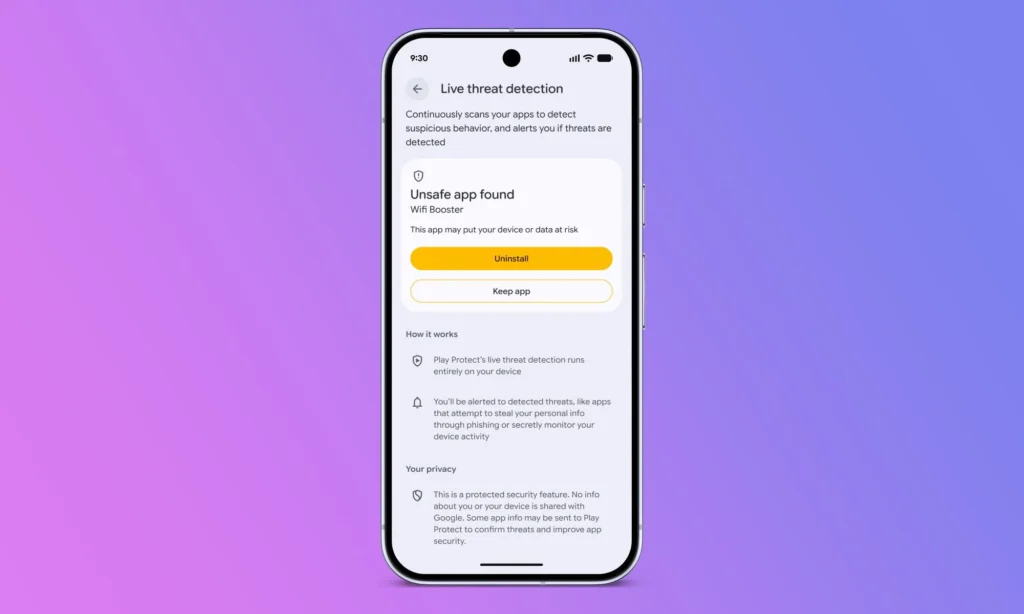
Two major behaviors are now on its radar:
- Apps that secretly forward your SMS messages to another number
- Apps that misuse accessibility overlays to display hidden or imperceptible content on the screen
That second one matters because malicious apps can use accessibility features to trick users into tapping something they never meant to tap. It is a common tactic in scam apps, fraud tools, and other shady software that tries to control what you see or do on your phone.
The bigger upgrade is dynamic signal monitoring. On Android 17 devices, Live Threat Detection can monitor how apps interact with the system in real time and look for known suspicious patterns. That includes apps that change or hide their icon, then quietly launch from the background, or apps that abuse accessibility permissions after installation.
Google says it can also push updated detection rules dynamically, which means Android can respond faster when new app-abuse patterns appear. Dynamic signal monitoring will be enabled on Android 17 devices, with protections rolling out in the second half of 2026.
Chrome on Android Will Scan APK Files Before You Download Them
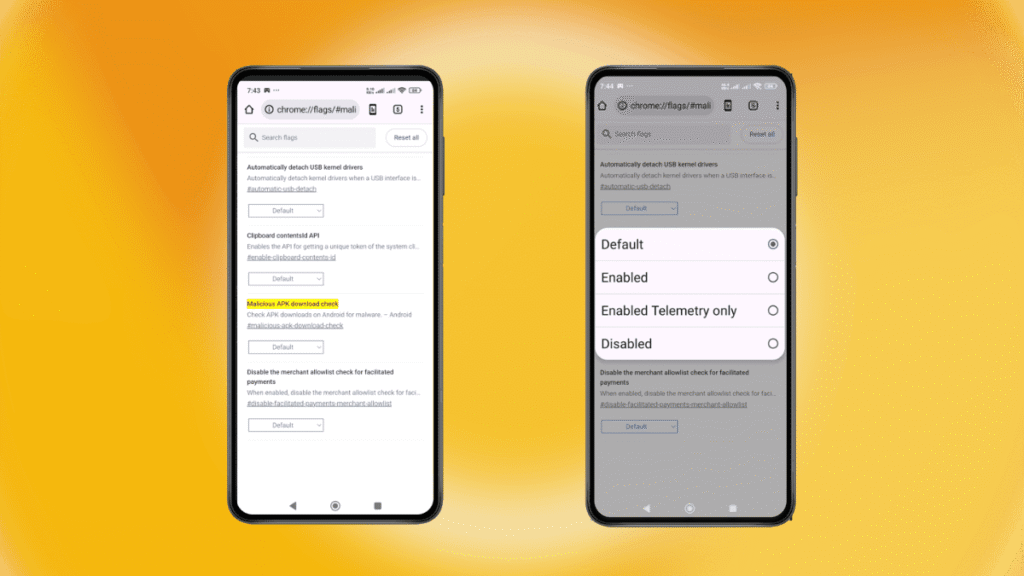
Sideloading apps from outside the Play Store has always carried risk, and Google is now adding another layer of protection directly inside Chrome on Android.
If Safe Browsing is turned on and you try to download an APK file, Chrome will evaluate the app package for known malware. If the APK is flagged as harmful, Chrome can stop the download before the file reaches your phone.
That matters because APK-based malware remains one of the easiest ways attackers target Android users outside the Play Store. Instead of waiting until after the app is downloaded or installed, Chrome can now block some threats earlier in the chain.
This will not make sideloading completely risk-free, and it only works when Safe Browsing is enabled. But for anyone who downloads apps, games, or modded APKs from the web, it is a meaningful extra checkpoint before a bad file ever lands on the device.
Advanced Protection Mode Is Becoming Much More Restrictive
Advanced Protection is Google’s opt-in high-security mode for users who face a higher risk of targeted attacks, including journalists, activists, executives, public figures, and high-profile professionals.
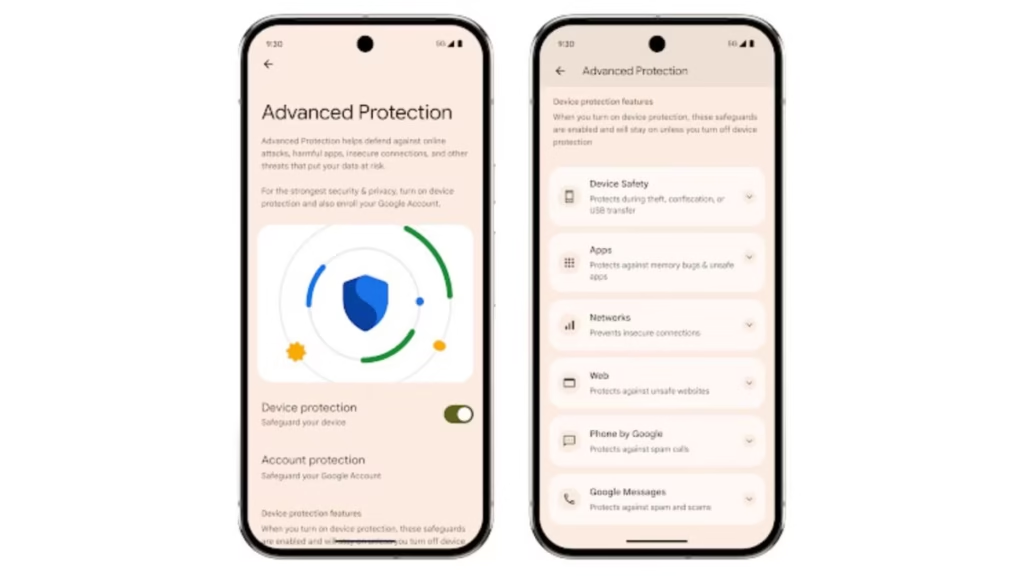
With Android 17, Google is making this mode more restrictive by adding several new protections:
What’s New in Advanced Protection Mode
- Blocks risky accessibility access: Android 17 removes accessibility service access from apps that are not labeled as genuine accessibility tools. This helps stop malicious apps from abusing accessibility permissions to read the screen, control taps, or trick users into taking unwanted actions.
- Disables device-to-device unlocking: Advanced Protection will now turn off device-to-device unlocking. This closes a possible attack path where a compromised trusted device could be used to unlock another device.
- Turns off Chrome WebGPU support: Google is also disabling Chrome WebGPU support when Advanced Protection is enabled. WebGPU can improve browser graphics performance, but for high-risk users, Google is treating it as an unnecessary attack surface.
- Adds scam detection to chat notifications: Android 17 will integrate scam detection directly into chat notifications, helping flag suspicious messages before users open or interact with them.
- Adds Android Enterprise support: Later in 2026, organizations will be able to enable Advanced Protection by policy on managed Android devices, making it more useful for companies and high-risk teams.
- Expands USB protection: USB protection is now available in Advanced Protection on all Pixel devices running Android 16 or newer. Google says this protection will come to more Android devices soon.
- Includes Intrusion Logging support: Google is also rolling out Intrusion Logging to devices running the Android 16 December update and newer. This gives high-risk users and security teams privacy-preserving forensic logs if a device compromise is suspected.
Together, these changes make Advanced Protection feel less like a simple security toggle and more like a true lockdown mode for people who cannot afford to take chances with their phone security.
Mark as Lost Gets a Critical New Layer: Biometric Lock
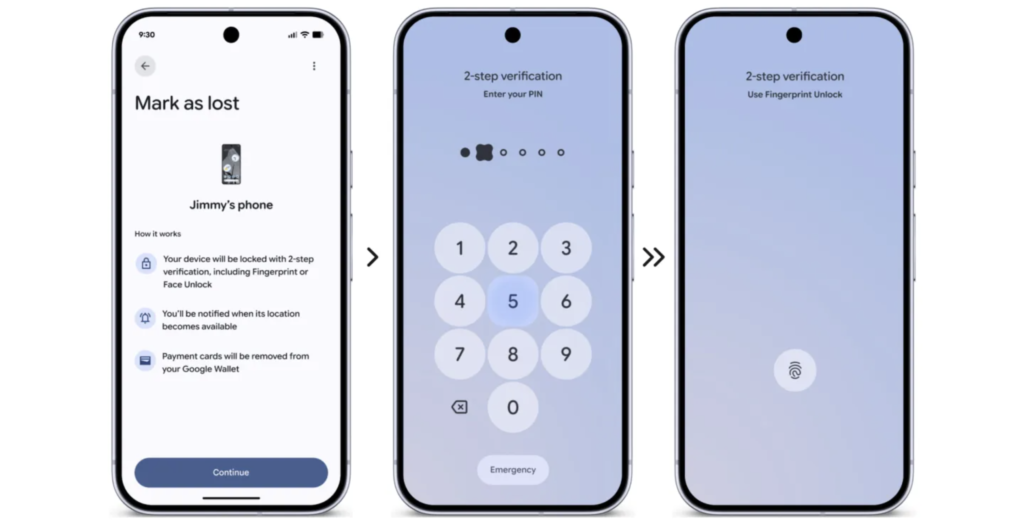
Find Hub’s Mark as Lost feature is getting a major security upgrade in Android 17. Until now, a stolen phone could still be vulnerable if the thief had already seen or obtained your PIN. Android 17 closes that gap by adding biometric authentication to the recovery process.
Once you mark your phone as lost, Android requires your fingerprint or face unlock before the device can be accessed again. Your PIN or passcode alone is no longer enough. That means even if someone knows your unlock code, they cannot easily re-access the phone or turn off device tracking after Mark as Lost is enabled.
Google is also adding extra restrictions when Mark as Lost is triggered:
- Biometric unlock becomes required: The phone now requires fingerprint or face authentication in addition to the regular PIN or passcode.
- Quick Settings are hidden: This prevents someone from quickly toggling key settings from the lock screen.
- New Wi-Fi connections are blocked: A thief cannot easily connect the device to a new network after it is marked lost.
- New Bluetooth connections are disabled: This limits attempts to pair the phone with unfamiliar accessories or devices.
Together, these changes make Mark as Lost far more useful in real-world theft situations. It is not just about locating the phone anymore; it is about cutting off the easy ways someone might regain access, disable tracking, or keep using the device after it has been reported lost.
Theft Protection Features Are Now On by Default, Globally
Google is making Android’s theft protections much harder to miss. After a successful pilot in Brazil, the company is expanding default-on theft protections globally with Android 17.
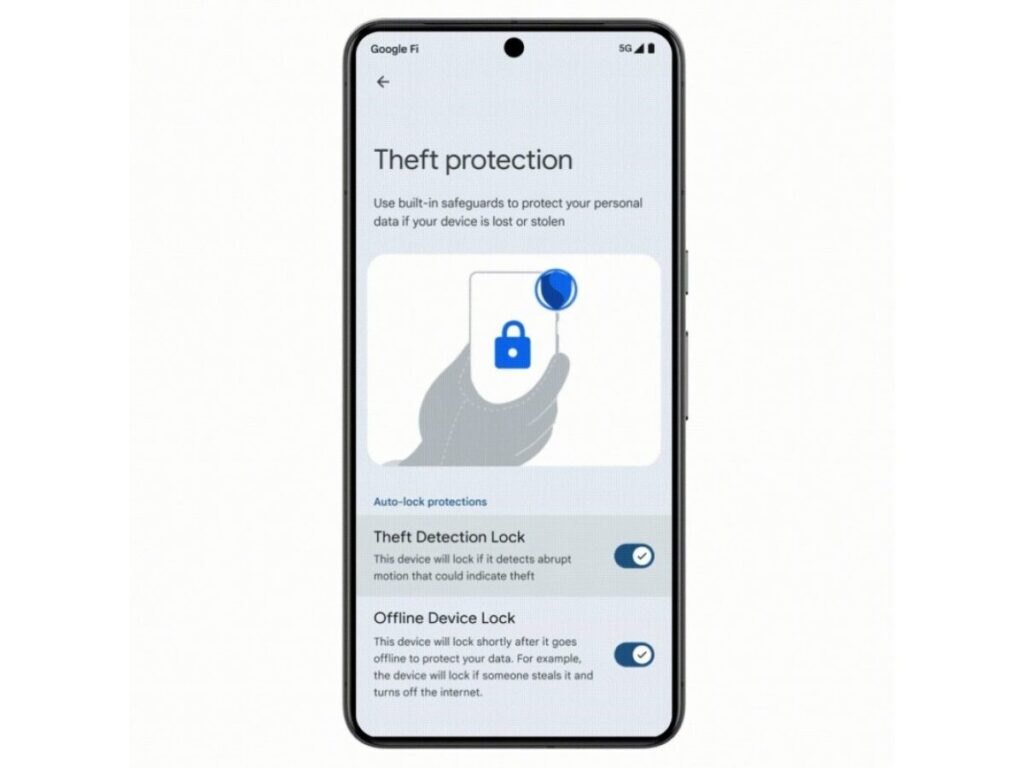
That means key features like Remote Lock and Theft Detection Lock will now be enabled automatically on:
- New Android 17 devices
- Devices that are freshly reset
- Devices upgraded to the latest Android OS
Once active, these protections can help lock your phone quickly if it is snatched or stolen. Theft Detection Lock uses on-device signals to detect a possible snatch-and-run theft, while Remote Lock lets you lock your device remotely if you lose access to it.
Google is also extending these default-on protections to Android 10 and newer devices in selected high-demand markets, including Argentina, Chile, Colombia, Mexico, and the UK.
This is the kind of security change that actually matters at scale. Most users never dig through settings to enable advanced safety features, so making theft protection opt-out instead of opt-in gives more people a stronger baseline the moment they set up, reset, or upgrade their phone.
Brute Force PIN Attacks Are Getting Harder to Pull Off
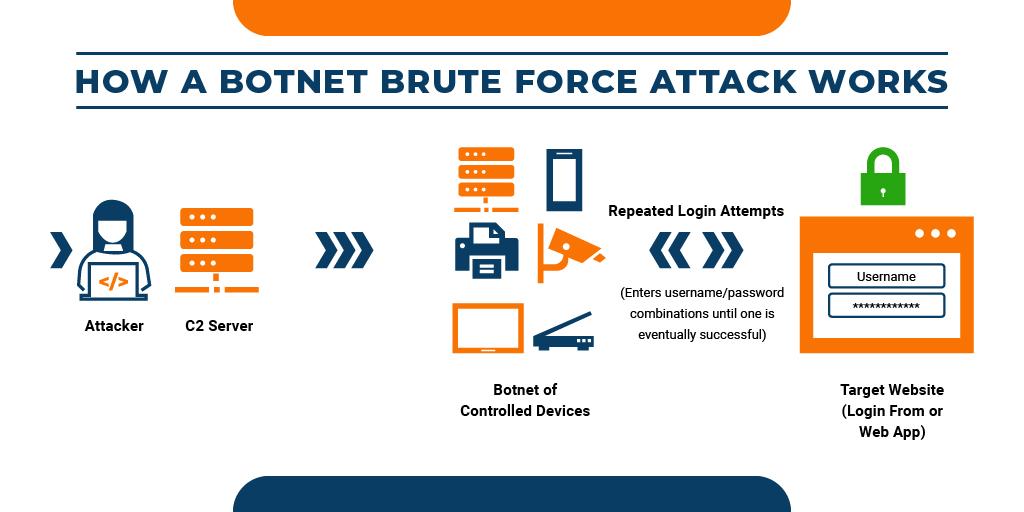
Android 17 is making it harder for someone to keep guessing your PIN or password after they get physical access to your phone.
Google says supported Android 17 devices will significantly reduce the number of failed PIN or password attempts someone can make. The company has not shared the exact limit, but it has confirmed two important changes: longer delays between failed attempts and better lock screen messaging after repeated failures.
What’s Changing
- Fewer failed unlock attempts allowed: Android 17 will reduce how many times someone can try to guess your PIN or password before the phone locks down further.
- Longer delays between failed attempts: After repeated wrong guesses, Android will add longer mandatory wait times before another attempt can be made. This makes rapid brute-force guessing much less practical.
- Clearer lock screen information: Google is improving how the lock screen displays information after failed attempts, making repeated unlock failures more visible and easier to understand.
- Better protection if your phone is stolen: These changes are especially useful if a thief has your phone in hand and is trying common PINs, guessed passwords, or repeated unlock combinations.
The goal is simple: make guessing attacks slow, obvious, and frustrating. Even without knowing Google’s exact thresholds, longer delays and tighter attempt limits make brute-force attacks far less likely to succeed before the owner notices or remotely locks the device.
You Can Now Share Your Precise Location Temporarily
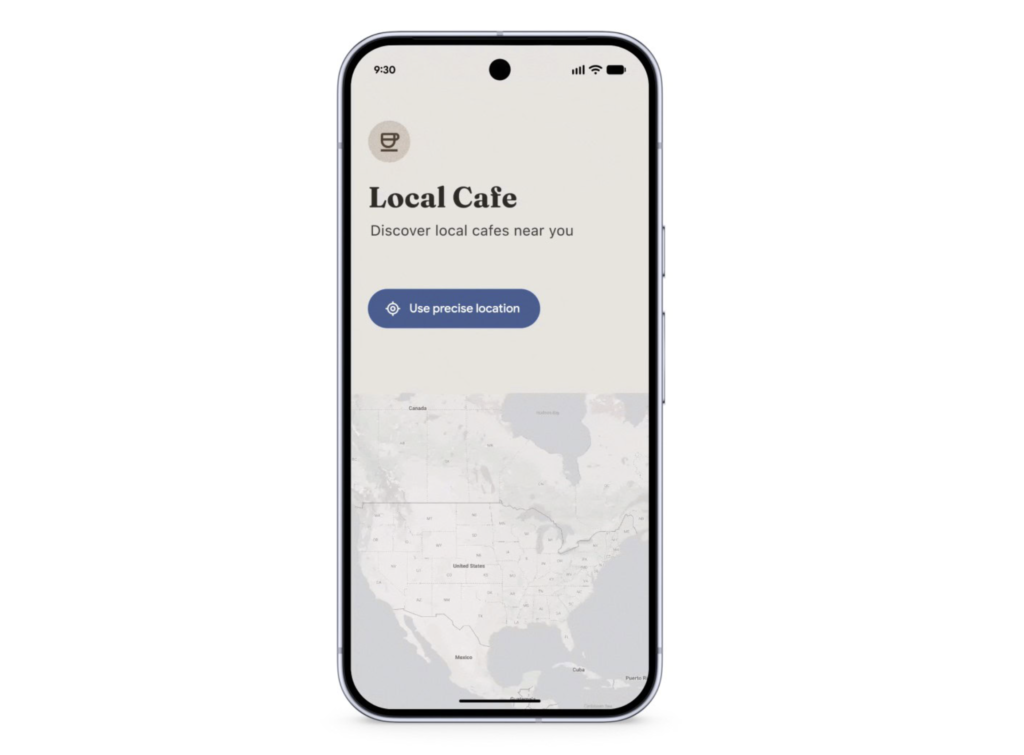
Android 17 is adding a more private way to share your exact location without giving an app long-term access.
Today, Android already lets you choose between approximate and precise location, but some apps still push users into granting more access than they actually need. Android 17 fixes this with a new system-provided Location Button that apps can add directly inside their interface.
What Changes…
When you tap this button, the app gets precise location access for the current session only. That means you can share your exact location for a specific action, like finding a nearby store, tagging a place, or booking a ride, without permanently handing over precise location permission.
Once the session ends, that temporary precise access goes away automatically. You do not need to dig through settings afterward to revoke it.
This feature is already included in Android 17 Beta 3, where Google lists it as a privacy and security update. Apps will need to support the new button, so you may not see it everywhere immediately, but it gives developers a cleaner and more privacy-friendly way to request exact location only when it is truly needed.
The Location Indicator Is Now Harder to Miss
Android already shows clear indicators when apps access sensitive hardware like your camera or microphone. With Android 17, Google is giving location access a similar transparency upgrade.
Now, when an app accesses your location, Android shows a more prominent indicator at the top of the screen. This makes it easier to notice when an app is actively pulling location data instead of leaving that activity buried inside Settings.
The indicator is also interactive. Tap it, and Android opens a Recent app use dialog showing which apps have recently accessed your location. From there, you can manage those permissions immediately instead of digging through multiple settings menus.
Why It Matters
This is a small UI change with a real privacy benefit. Location access is easy to forget after you grant it, especially for apps you rarely use. By making location use visible in the moment, Android 17 gives users a faster way to spot unexpected access and shut it down before it becomes a long-term privacy problem.
Apps Will Only See the Contacts You Actually Choose to Share
For years, contact permissions on Android have felt too broad. If an app needed one friend’s phone number or email address, it often had to ask for access to your entire address book. Android 17 finally gives developers a better option.
The new Android Contact Picker lets apps request only the contact details they actually need. Instead of handing over your full contacts list, you can choose specific contacts and, in some cases, specific data fields such as phone numbers, email addresses, or postal addresses.
What Changes
- You choose the contacts
Apps no longer need broad access to your entire address book just to connect you with one person. With the new picker, you decide which contacts to share. - Apps can request only specific fields
Developers can specify the type of contact data they need, such as a phone number or email address, instead of receiving the full contact record by default. - Access is temporary
Android grants temporary, session-based read access to the selected contact data, reducing the need for long-term contacts permission. - It reduces reliance on full contacts permission
The feature is designed as a privacy-preserving alternative to the broadREAD_CONTACTSpermission, which has traditionally exposed far more data than many apps actually needed.
For anyone who has ever hesitated before tapping Allow on a contacts permission prompt, this is a meaningful change. Android 17 does not just give users a yes-or-no choice; it gives them more control over exactly which contact details an app can see, and for how long.
Android Will Now Verify Whether Your OS Build Is Legitimate
Android 17 is adding a new layer of trust for users who want to know whether their phone is running an official Android build.
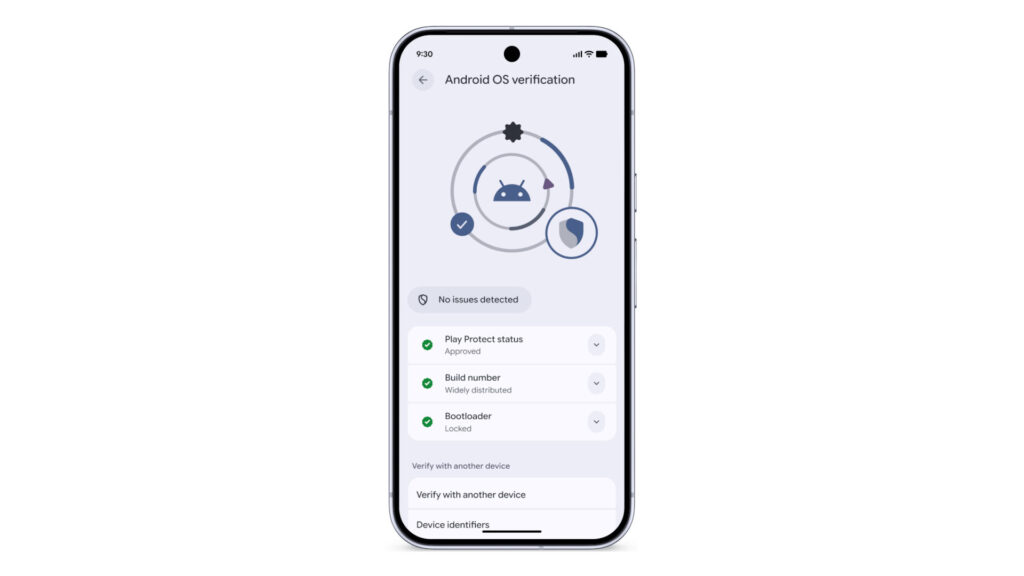
This is especially important in markets where unofficial or modified Android builds are more common. Some of these builds can look legitimate on the surface, while quietly weakening device security underneath. To address that, Google is introducing Android OS Verification, a new feature that helps users confirm whether their device is running an official, widely distributed version of Android.
What Changes
- Android can verify the OS build: Android 17 will help users check whether their device is running an official Android build instead of a modified version designed to mimic legitimate software.
- Pixel phones get it first: Google says Android OS Verification is launching initially on Pixel devices before broader availability.
- It targets malicious modified builds: The feature is designed to fight unofficial Android versions that may appear normal but compromise the integrity of the device.
- Google is adding a public cryptographic ledger: Alongside OS verification, Google is using a public, append-only ledger to provide cryptographic proof that production Google apps across Android, including foundational GMS APIs, are authentic versions released by Google.
- Pixel users get stronger end-to-end proof: For Pixel users, this works with Pixel System Image Transparency to prove that both the system image and Google-signed apps are official production software.
This is not the flashiest Android 17 security feature, but it may be one of the most important for ecosystem trust. If users can verify that both the operating system and key Google apps are authentic, Android becomes much harder to quietly compromise through fake builds or tampered system software.
OTP Theft Is Getting Blocked, and Quantum-Era Threats Are Already on Google’s Radar
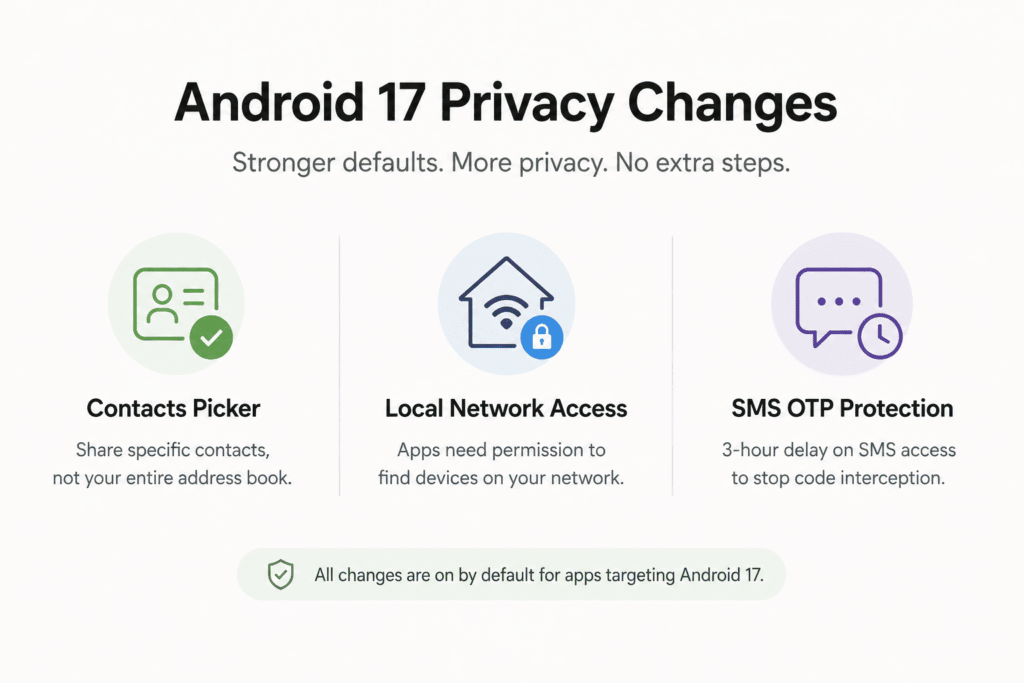
Two forward-looking additions that round out the security picture:
- OTP hiding:Android will automatically hide one-time passwords from most apps for three hours after they’re received a direct countermeasure against malicious apps that scrape authentication codes from notifications. Already live in Beta 2.
- Post-Quantum Cryptography (PQC):Quantum computing is not an immediate consumer-level threat, but the encryption we rely on today will eventually be vulnerable to it. Google is getting ahead of that curve now.
- Improved 2G protections:Carriers can now disable 2G by default in regions where the aging standard primarily serves as an attack surface rather than a communications tool.
These changes are not flashy, but they show where Android security is heading: fewer exposed authentication codes, stronger protection against outdated network attacks, and cryptography that is already preparing for the post-quantum era.
Conclusion
Android 17’s security upgrades are not built around one dramatic feature. The real story is the layering.
Verified Financial Calls attack bank impersonation scams. Live Threat Detection watches for malicious app behavior. Chrome scans risky APK downloads earlier. Advanced Protection gets stricter. Theft protection becomes harder to bypass. Location and contacts permissions become more precise. OTPs are harder to scrape. OS verification makes fake builds easier to spot.
Some of these features will arrive with Android 17 directly, while others will roll out through Google Play services, Chrome, Find Hub, supported Android versions, Pixel updates, or participating apps and banks. But taken together, they show where Android security is clearly headed: fewer silent permissions, fewer easy theft loopholes, stronger scam protection, and more verification built directly into the system.