

WhatsApp has always been one of the most popular messaging apps because it keeps communication simple. You can send messages, make voice and video calls, share photos, join groups, post status updates, and stay connected with people without paying a monthly fee.
Now, Meta is introducing a new optional paid subscription called WhatsApp Plus, and many users are wondering what it means. Is WhatsApp becoming paid? Is WhatsApp Plus a separate app? Is it the same as the old WhatsApp Plus APK?
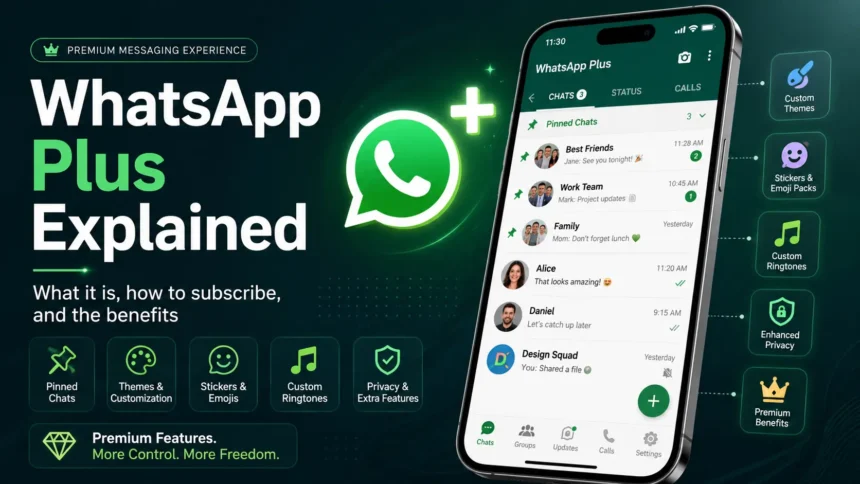
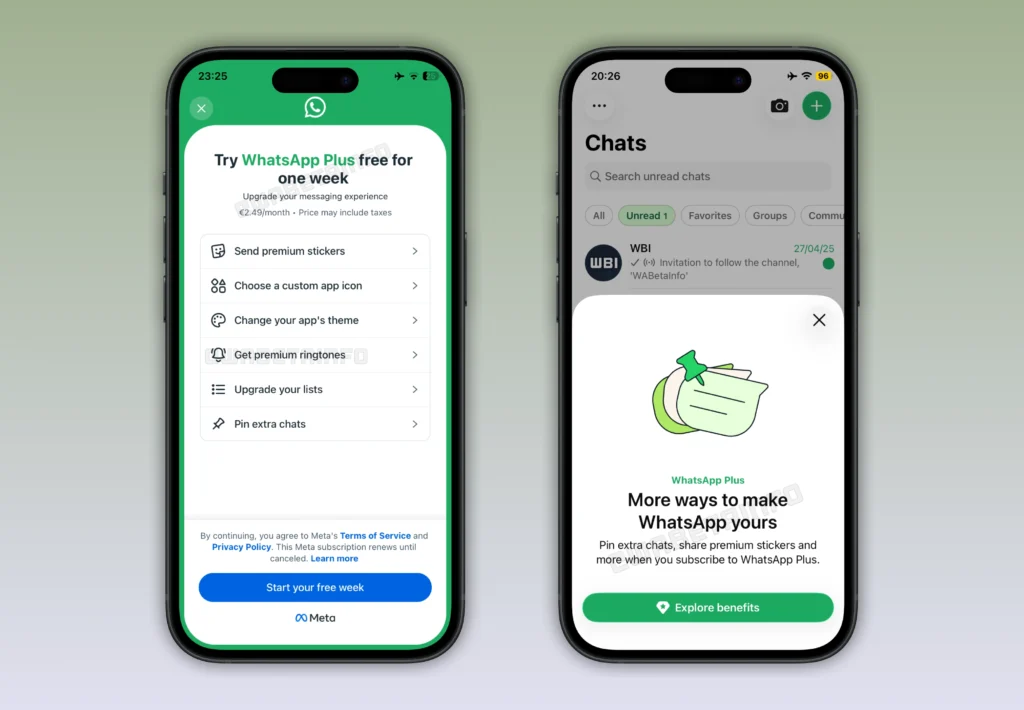
The answer is simple: WhatsApp Plus is an optional subscription inside the official WhatsApp app. It is designed for users who want extra customization, more pinned chats, premium stickers, custom icons, ringtones, and additional chat personalization options.
However, the name can be confusing because “WhatsApp Plus” has also been used for unofficial third-party WhatsApp mod apps in the past. The official WhatsApp Plus subscription is different from those APKs. If you see a website asking you to download a separate WhatsApp Plus APK, that is not the official subscription.
Meta confirmed that WhatsApp Plus is an optional subscription designed for users who want more ways to organize and personalize their WhatsApp experience.
What Is WhatsApp Plus?
WhatsApp Plus is a paid subscription plan for WhatsApp Messenger users. It does not replace the regular WhatsApp app, and it does not make normal WhatsApp features paid.
You can think of WhatsApp Plus as a premium add-on. It gives subscribers extra personalization and convenience features while keeping the main WhatsApp experience free for everyone.
Regular WhatsApp users can still send messages, make voice calls, use video calls, create groups, post status updates, and use end-to-end encrypted chats without subscribing. The paid plan mainly adds cosmetic and organization-focused features such as themes, app icons, premium stickers, ringtones, and more pinned chats.
In simple words, WhatsApp Plus is not required to use WhatsApp. It is mainly for users who want more control over how the app looks and how their chats are organized.
Is WhatsApp Plus Official?
Yes, the new WhatsApp Plus subscription is official. WhatsApp has a Help Center page for subscribing to WhatsApp Plus, which confirms that this is an official subscription option for eligible users.
But users need to be careful because there are two different meanings of “WhatsApp Plus” online.
The first one is the official WhatsApp Plus subscription. This appears inside the official WhatsApp app for eligible users. It is not a separate app and does not require downloading an APK.
The second one is the older unofficial WhatsApp Plus APK or mod app. These apps are created by third-party developers and are not supported by WhatsApp or Meta. They are usually found on third-party websites and may claim to offer extra themes, privacy tools, or hidden features.
You should avoid unofficial WhatsApp Plus APKs because they can create privacy, security, and account risks. The official WhatsApp Plus subscription should only be accessed inside the official WhatsApp app.
WhatsApp Plus Features Explained
WhatsApp Plus focuses mainly on personalization and chat organization. It does not change the basic way WhatsApp works, but it adds extra controls for users who want a more customized experience.
Here are the main WhatsApp Plus features.
Expanded Pinned Chats
One of the most useful WhatsApp Plus features is the ability to pin more chats.
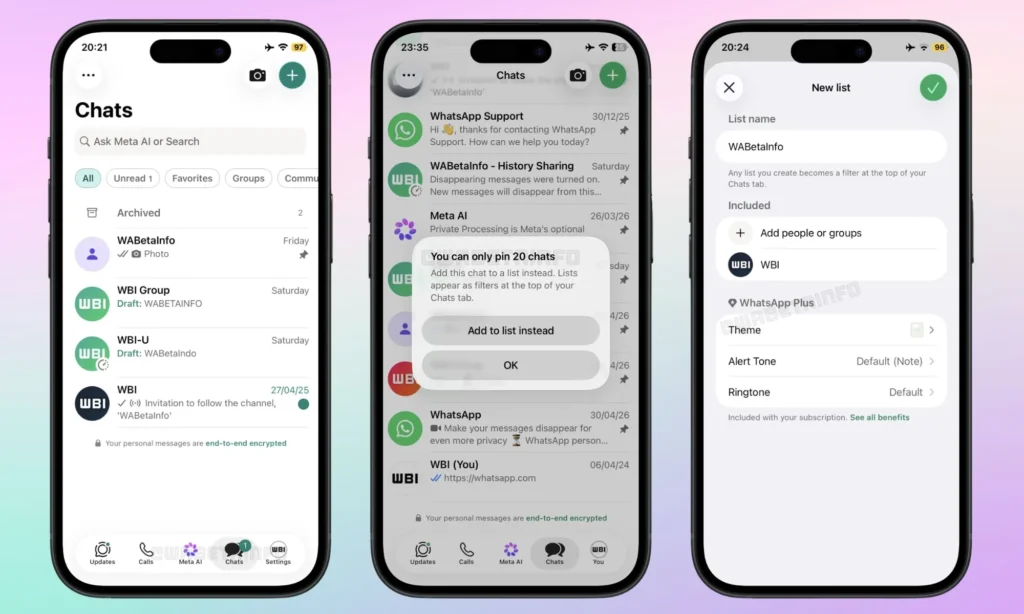
On the free version of WhatsApp, users can pin only a limited number of chats. WhatsApp Plus reportedly increases the pinned-chat limit from 3 chats to 20 chats.
This can be helpful if you use WhatsApp for work, family, school, communities, or multiple group chats. Instead of searching for important conversations again and again, you can keep more chats pinned at the top of your chat list.
For heavy WhatsApp users, this may be one of the most practical reasons to subscribe.
Custom Chat Themes
WhatsApp Plus also gives users more theme options. Subscribers can personalize the look of the app using additional theme colors and interface customization options.
Reports say WhatsApp Plus includes 18 accent colors that can change the default green appearance of the app.
This feature is mainly for users who want WhatsApp to look more personal. Some may prefer a clean and minimal design, while others may want brighter or more expressive colors.
Custom App Icons
Another WhatsApp Plus feature is custom app icons. This allows users to change how the WhatsApp icon appears on their phone’s home screen.
Reports say WhatsApp Plus offers 14 alternate app icons, including different visual styles such as minimal, artistic, and decorative designs.
This is similar to other premium social app subscriptions that offer icon customization as part of their paid plans.
Premium Sticker Packs
WhatsApp Plus also includes premium sticker packs. These stickers may include special effects or full-screen animations.
The best part is that recipients can still view these premium stickers even if they do not have WhatsApp Plus. That makes the feature more useful because your friends or family do not need to subscribe just to see the stickers.
This feature is not essential, but it can be fun for users who enjoy expressive chats.
Exclusive Ringtones and Alert Tones
WhatsApp Plus also adds exclusive ringtones and notification tones. Reports mention 10 premium ringtones for subscribers.
This gives users more ways to personalize calls, alerts, and chat notifications. If you like assigning different sounds to different contacts or groups, this could be a useful feature.
Bulk Theme and Notification Settings
WhatsApp Plus may also let users apply custom themes, alert tones, and ringtones across multiple chat lists at once.
This is useful because you do not need to customize every chat manually. For example, you may want one theme or ringtone style for family chats, another for work chats, and another for personal groups.
For users who organize conversations using chat lists, this feature can save time.
WhatsApp Plus Benefits
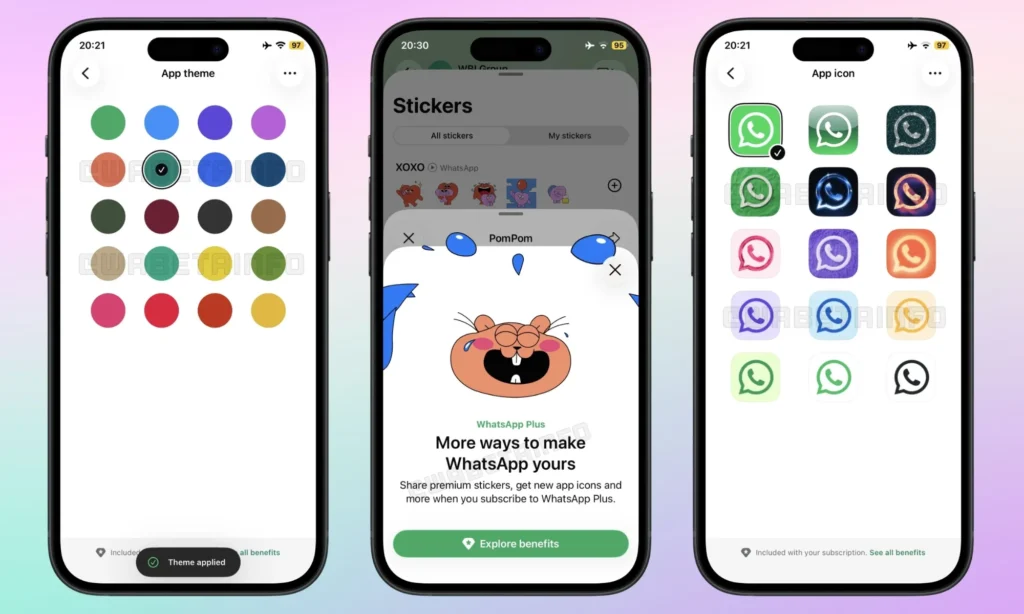
The biggest benefit of WhatsApp Plus is personalization. WhatsApp has traditionally focused on simplicity, but many users want more control over how the app looks and feels. WhatsApp Plus gives those users more themes, colors, icons, stickers, and sounds.
Another major benefit is better chat organization. The ability to pin up to 20 chats can be useful for people who use WhatsApp throughout the day. If you manage many conversations, this can help you keep important chats easier to access.
WhatsApp Plus also gives heavy users a more premium experience without affecting free users. If you do not subscribe, your regular WhatsApp account should continue working normally. Messaging, voice calls, video calls, groups, status updates, and end-to-end encryption remain free.
In short, WhatsApp Plus benefits users who want more customization and convenience. It is not necessary for everyone.
WhatsApp Plus Price
WhatsApp Plus pricing may vary by country and region. There is no single global price that applies everywhere.
Reports mention a price of around €2.49 per month in Europe, while some regions may see different local pricing. Some eligible users may also get a free trial depending on the country and rollout.
Here is a simple pricing overview:
| Region | Reported WhatsApp Plus Price | Status |
|---|---|---|
| Europe | Around €2.49/month | Reported pricing |
| Mexico | Around $29 local pricing | Reported pricing |
| United States | Not fully confirmed | May vary by rollout |
| India and other regions | Not fully confirmed | Depends on availability |
Because WhatsApp Plus is still rolling out gradually, the price shown in your app may be different from the prices reported in other countries.
Who Can Subscribe to WhatsApp Plus?
Not every WhatsApp user can subscribe immediately. WhatsApp Plus is rolling out gradually, so availability may depend on your country, account, device, and app version.
To subscribe, you need an active WhatsApp Messenger account and your phone number must be from a country where WhatsApp Plus is supported. You also need to follow WhatsApp’s and Meta’s applicable terms and standards.
At this stage, WhatsApp Plus is meant for regular WhatsApp Messenger users. Reports say it is not available for WhatsApp Business accounts.
If you do not see the subscription option in your app, it likely means WhatsApp Plus has not rolled out to your account yet.
How to Subscribe to WhatsApp Plus
You should subscribe to WhatsApp Plus only through the official WhatsApp app. Do not download a separate WhatsApp Plus APK from any website.
Here is how to check if WhatsApp Plus is available for your account.
Step 1: Update WhatsApp
First, update WhatsApp from the Google Play Store or Apple App Store. The subscription option is more likely to appear if you are using the latest version of the official app.
Step 2: Open WhatsApp Settings
Open WhatsApp and go to Settings.
On iPhone, Settings is usually available in the bottom navigation bar. On Android, you can usually access Settings from the three-dot menu.
Step 3: Go to Subscriptions
Go to:
WhatsApp Settings > Subscriptions > WhatsApp Plus
If you see WhatsApp Plus in this section, your account may be eligible for the subscription. WhatsApp’s Help Center page confirms the official subscription flow for WhatsApp Plus.
If you do not see the option, the feature is not available for your account, device, or region yet.
Step 4: Tap Continue
After selecting WhatsApp Plus, tap Continue.
Step 5: Review the Price and Benefits
Before subscribing, review the subscription price, billing cycle, free trial details if available, and the list of benefits included in your region.
Step 6: Confirm Payment
Complete the payment using the official in-app payment method, Google Play billing, or Apple App Store billing, depending on your device.
Once the payment is confirmed, WhatsApp Plus benefits should become available on your account.
How to Manage or Cancel WhatsApp Plus
You can manage WhatsApp Plus from the same subscription area inside WhatsApp.
Go to: WhatsApp Settings > Subscriptions > WhatsApp Plus
From there, you should be able to view your active plan, check available benefits, and manage subscription details.
Like most app subscriptions, WhatsApp Plus is expected to renew automatically unless canceled. On iPhone, users can manage or cancel the subscription through Apple’s App Store subscription settings. On Android, cancellation should be handled through Google Play billing if that is where the subscription was purchased.
If you cancel WhatsApp Plus, your regular WhatsApp account should continue working normally. However, premium features such as extra pinned chats, custom app icons, premium stickers, exclusive ringtones, and additional themes may no longer be available after the subscription ends.
WhatsApp Plus Availability and Supported Devices
WhatsApp Plus is rolling out gradually, so not everyone will see it at the same time.
Initial reports said the subscription was being tested with a limited number of Android users. Later reports said WhatsApp Plus had also started appearing for some iPhone users.
That means availability may depend on your device, app version, region, and WhatsApp account.
WhatsApp Plus is currently focused on the regular WhatsApp Messenger app. If you use WhatsApp Business, you may not see the subscription option.
WhatsApp Plus vs WhatsApp: What’s the Difference?
The main difference between WhatsApp and WhatsApp Plus is customization. Free WhatsApp includes the core messaging experience, while WhatsApp Plus adds extra premium features.
| Feature | Free WhatsApp | WhatsApp Plus |
|---|---|---|
| Text messaging | Yes | Yes |
| Voice calls | Yes | Yes |
| Video calls | Yes | Yes |
| Group chats | Yes | Yes |
| Status updates | Yes | Yes |
| End-to-end encryption | Yes | Yes |
| Custom themes | Limited | More options |
| Accent colors | Limited | 18 reported colors |
| Custom app icons | No/limited | 14 reported icons |
| Premium stickers | Limited | Yes |
| Exclusive ringtones | No/limited | 10 reported ringtones |
| Pinned chats | Limited | Up to 20 reported |
| Bulk chat customization | No/limited | Yes |
| Monthly fee | Free | Paid subscription |
Free WhatsApp is still enough for most users. WhatsApp Plus is mainly for users who want a more personalized and organized experience.
Is WhatsApp Plus Worth It?
WhatsApp Plus may be worth it if you use WhatsApp heavily every day and want more customization.
It can be useful if you manage many chats and want to pin more than the usual limit. It can also be useful if you like custom themes, premium stickers, alternate app icons, and exclusive ringtones.
However, WhatsApp Plus may not be worth it for users who only use WhatsApp for basic messaging and calls. If you do not care about themes, stickers, icons, or extra pinned chats, the free version of WhatsApp is still enough.
The best way to look at WhatsApp Plus is this: it is not a must-have upgrade. It is an optional personalization subscription.
WhatsApp Plus Safety: Avoid Fake APKs and Mod Apps
This is the most important thing to remember.
The official WhatsApp Plus subscription is not the same as unofficial WhatsApp Plus APKs. If a website asks you to download a separate WhatsApp Plus app, that is not the official subscription.
Unofficial WhatsApp mods can create serious risks. They may not follow WhatsApp’s security standards, they may put your data at risk, and they may violate WhatsApp’s terms.
To stay safe:
- Download WhatsApp only from the Google Play Store or Apple App Store.
- Do not install WhatsApp Plus APKs from third-party websites.
- Do not trust apps that ask for your WhatsApp verification code.
- Do not use modified WhatsApp apps such as unofficial WhatsApp Plus or GB WhatsApp.
- Subscribe only if the option appears inside the official WhatsApp app.
If you are already using an unofficial WhatsApp Plus APK, it is safer to switch back to the official WhatsApp app.
Final Verdict
WhatsApp Plus is an optional paid subscription for users who want more customization and chat-management features inside WhatsApp. It adds features such as expanded pinned chats, custom themes, premium stickers, alternate app icons, exclusive ringtones, and bulk customization tools.
The regular WhatsApp app remains free, and core features like messaging, calls, groups, status updates, and end-to-end encryption are not locked behind WhatsApp Plus.
For casual users, WhatsApp Plus is not necessary. But for heavy WhatsApp users who want more personalization and easier chat organization, it could be a useful upgrade.
Just make sure you use only the official WhatsApp app. If you see a WhatsApp Plus APK on a third-party website, avoid it.
What is WhatsApp Plus?
WhatsApp Plus is an optional paid subscription for WhatsApp Messenger users. It adds extra customization and organization features such as themes, premium stickers, app icons, ringtones, and expanded pinned chats.
Is WhatsApp Plus official?
Yes, the new WhatsApp Plus subscription inside the official WhatsApp app is official. However, third-party WhatsApp Plus APKs and mod apps are unofficial and should be avoided.
How do I subscribe to WhatsApp Plus?
Open WhatsApp and go to Settings > Subscriptions > WhatsApp Plus. If the option appears, you can tap Continue, review the price and benefits, and confirm the payment through the official app store billing system.
Why can’t I see WhatsApp Plus in my app?
If you do not see WhatsApp Plus, it may not be available for your account, device, or country yet. The feature is rolling out gradually.
What is the WhatsApp Plus price?
The price may vary by region. Reports mention around €2.49 per month in Europe, but your local price may be different.
Is WhatsApp Plus available on iPhone?
Yes, WhatsApp Plus has started appearing for some iPhone users, but availability is still limited and may depend on region, app version, and account eligibility.
Is WhatsApp Plus available on Android?
Yes, WhatsApp Plus was initially reported for some Android users and is rolling out gradually.
Is WhatsApp Plus available for WhatsApp Business?
Reports suggest WhatsApp Plus is currently for regular WhatsApp Messenger accounts, not WhatsApp Business accounts.
What happens if I cancel WhatsApp Plus?
If you cancel WhatsApp Plus, your regular WhatsApp account should continue working normally. You may lose access to premium features such as extra pinned chats, custom themes, premium stickers, app icons, and exclusive ringtones after the subscription ends.
Is WhatsApp Plus safe?
The official WhatsApp Plus subscription inside WhatsApp is safe to access through the official app. However, unofficial WhatsApp Plus APKs from third-party websites are not official and may create privacy, security, or account risks.
Is WhatsApp Plus worth it?
WhatsApp Plus may be worth it if you want more themes, more pinned chats, premium stickers, custom icons, and exclusive ringtones. If you only use WhatsApp for normal messaging and calls, the free version is still enough.