Instagram launched a lot of features over the years – Stories, Reels, Close Friends, Notes, Channels. Some stuck. Some did not. Instants, which went live globally on May 13, 2026, is different from all of them because it is deliberately designed to be the opposite of what Instagram became. No editing. No filters. No curated aesthetic. Just open the camera, take a photo, and send it to your friends before you can second-guess yourself.
That description sounds freeing on paper. In practice, it has sent a wave of accidental photos to people’s entire friend lists before users understood what they were tapping into. This guide explains everything about Instants – what it is, how it actually works, how to save your photos, how to delete what you sent, and how to shut the feature off entirely if you decide it is not for you.
What Is Instagram Instants?
Instants is Instagram’s new disappearing photo feature, launched globally on May 13, 2026. According to Instagram’s official announcement, the feature is built around one idea: “No edits, no pressure, just life as it happens.” It lets you share casual, everyday photos with your Close Friends or mutual followers directly through your DM inbox. Once your friends view the photo, it disappears. It also vanishes completely after 24 hours regardless of whether anyone opened it.
The feature lives inside the Instagram app you already have, tucked into the bottom-right corner of your DM inbox as a small stacked-photo icon. There is also a standalone Instants app available in select countries on both iOS and Android, which Instagram has been testing for users who want quicker camera access without navigating through the main app.
Instagram’s official words: “We want to make it easier to share in the moment with friends — so we’re introducing Instants, a new way to share casual, everyday photos that disappear after your friends view them. No edits, no pressure, just life as it happens.” — Instagram Official Blog, May 13, 2026
The concept borrows DNA from Snapchat’s disappearing photos, BeReal’s no-filter authenticity, and Locket’s widget-based intimate sharing. But unlike all three, Instants does not require a separate app. It sits inside Instagram’s DM system, meaning it works through your existing followers and Close Friends list without any additional setup.
What makes Instants genuinely distinct from Instagram’s existing features is the removal of the review step. Every other way to share on Instagram gives you a chance to preview before publishing. Instants removes that entirely. When you press the shutter, the photo goes out. That single design choice is responsible for most of the controversy surrounding the feature’s launch.
How Instagram Instants Works
Understanding how Instants actually behaves is the most important thing you can do before using it. The mechanics are simple, but a few specific behaviors catch people off guard.
The Core Mechanic
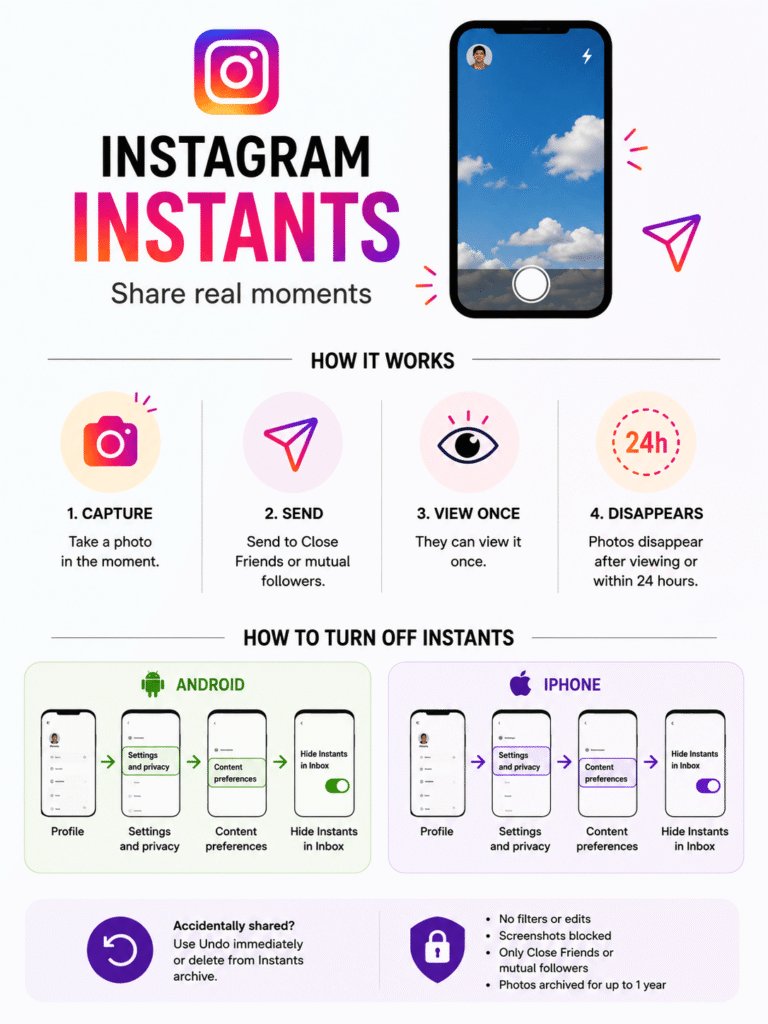
You open the Instants camera, take a photo in real time, and it sends immediately to your selected audience. There is no upload step, no preview screen, and no publish button distinct from the shutter. Tapping the shutter is the publish action. The photo arrives in each recipient’s inbox as a stacked icon. They tap to view it once, and it disappears. It is gone from their inbox after viewing and removed entirely after 24 hours whether viewed or not.
The Audience Default Problem
Below the shutter button sits a toggle with two options: Friends and Close Friends. It defaults to Friends. Friends in this context means every account that follows you back — your entire mutual followers list. This is not a small group for most users. It is everyone who has followed you and whom you follow back, potentially hundreds or thousands of people depending on your account size.
Most users do not notice this toggle before their first tap. The result is photos going to far more people than intended, which is the root cause of almost every complaint about Instants since its launch.
Most important thing to know: The moment you press the shutter, the photo sends automatically. There is no confirmation screen. The “Friends” audience is selected by default. Check the audience toggle before you take any photo, not after. Switching it takes one tap and can save significant awkwardness.
What Happens to the Photo After Sending
- Recipients see the Instant as a stacked photo icon in the bottom-right corner of their DM inbox
- They tap to view it once – after viewing it disappears immediately from their inbox
- If they do not open it, it disappears completely after 24 hours
- You receive a notification when someone views your Instant
- Friends can reply to your Instant and the reply lands in your DMs as a private message
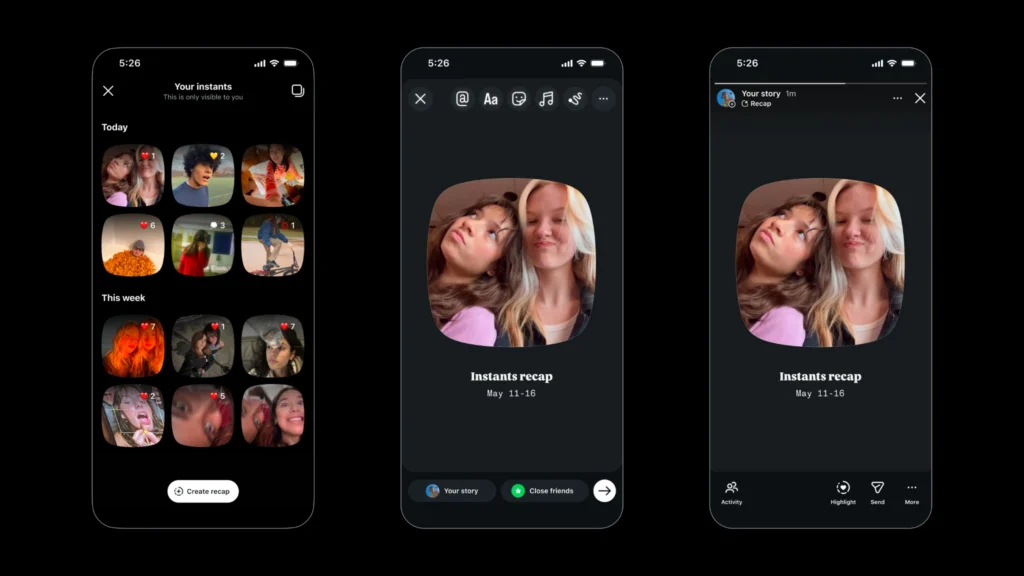
- Your Instant is saved to your personal private archive automatically for up to one year
- You can reshare any archived Instant as a Story recap from your archive
How to Send an Instant (Step by Step)
Here is the complete process from opening the app to sending your first Instant, including the steps most tutorials leave out.
- Open Instagram and go to your DMs. Tap the message icon (paper airplane or chat bubble) at the top right of your home screen to open your direct message inbox.
- Find the Instants icon. Look for the small stacked-photo icon in the bottom-right corner of your inbox screen. If you have never opened it, a brief intro tutorial will play the first time you tap it explaining how the feature works.
- Check your audience before anything else. Before taking a photo, look below the shutter button for the audience toggle. It will show either Friends or Close Friends. If you want a smaller audience, tap it now to switch to Close Friends. Do this before your finger moves to the shutter.
- Take the photo. Point the camera at what you want to share and press the shutter button. The photo is captured and sent simultaneously. There is no preview screen.
- Optional: add a text caption before sending. You can type a short text caption. This is the only edit allowed. No filters, no stickers, no cropping, no camera roll uploads.
- Use Undo immediately if you sent to the wrong audience. Right after sending, an Undo button appears beneath the shutter. Tap it within a few seconds to retract the photo before anyone sees it. This is your fastest and most reliable safety net.
Pro tip: Instagram says users can now enter the camera even faster via the Instants standalone app in select countries, which skips the inbox navigation entirely. If you use Instants regularly, the standalone app reduces friction significantly.
Who Sees Your Instants?
Your Instant goes to one of two groups your choice, made before you press the shutter.
- 👥 Friends (Default): Every account that follows you AND that you follow back. This is your entire mutual followers list. For a personal account this might be 50 people. For an active creator it could be thousands. This is the default setting every time you open Instants.
- ⭐ Close Friends: Only the accounts on your manually curated Close Friends list. This is the same list used for Close Friends Stories. If you have not set up your Close Friends list yet, go to your profile, tap the three-line menu, and select Close Friends to build the list before using Instants.
There is no option to send an Instant to a single specific person or to a custom group outside of these two audiences. It is a broadcast format, not a one-to-one DM. If you want to share a photo with just one friend, a regular DM photo or a disappearing photo in an individual DM chat remains the better choice.
No viewers list: Unlike Stories, Instants do not show you who viewed your photo. You receive a notification that someone viewed it, but the feature intentionally removes the viewers list to reduce social pressure around who did or did not open it.
How to Turn Off Instagram Instants
Instagram made the right call here: Instants can be disabled completely. Once hidden, you will not see the Instants icon in your inbox, and you will not receive any Instants that other people send to you either.
Full Disable (Recommended for Users Who Do Not Want It)
- Open Instagram and go to your Profile (tap your photo in the bottom right).
- Tap the three-line menu (hamburger icon) in the top right corner.
- Tap Settings and Activity.
- Scroll down and tap Content Preferences.
- Toggle on Hide Instants in Inbox.
- Done. Instants is fully removed from your app. The icon disappears from your inbox and you stop receiving Instants from others.
Temporary Snooze (Without Full Disable)
If you do not want to turn off Instants permanently but want a break from receiving them:
- Go to your DM inbox and find the Instants stacked-photo icon.
- Press and hold the icon, then swipe right.
- Instants are snoozed. The icon disappears temporarily but the feature remains active. Swipe left on the same area to resume receiving them.
Instants vs Stories vs Snapchat vs BeReal
| Feature | Instagram Instants | Instagram Stories | Snapchat | BeReal |
|---|---|---|---|---|
| Editing allowed | ✗ None | ✓ Full | Limited | ✗ None |
| Camera roll uploads | ✗ No | ✓ Yes | ✓ Yes | ✗ No |
| Disappears after viewing | ✓ Yes | ✗ No | ✓ Yes | ✗ No |
| Max duration before auto-delete | 24 hours | 24 hours | 24 hours | No limit |
| Audience options | Friends / Close Friends | All followers / Close Friends | Friends | Friends |
| Text captions | ✓ Yes | ✓ Yes | ✓ Yes | ✗ No |
| Lives inside existing app | ✓ Yes | ✓ Yes | ✗ Separate | ✗ Separate |
| Viewers list shown | ✗ No | ✓ Yes | ✗ No | ✓ Yes |
| Private archive saved | ✓ 1 year | ✓ Archive | ✓ Memories | ✗ No |
| Screenshot blocked | ✓ Yes | ✗ No | ✓ Yes | ✗ No |
The key distinction from Snapchat is that Instants lives inside an app most people are already using daily, with an existing social graph already built in. There is no friction of convincing friends to download a new app. The key distinction from BeReal is that Instants is user-initiated, you choose when to send rather than being prompted by the app at a random time. And the key distinction from Stories is the complete removal of editing, which is both the feature’s greatest strength and the source of most user anxiety about it.
How to Save an Instant to Your Camera Roll
Instants are designed to disappear, but that does not mean you lose them entirely. Every Instant you send is automatically saved to your private archive for up to one year. From that archive, you can download any Instant to your phone’s camera roll. Here is exactly how to do it.
How to Save Your Own Instant
- Open the Instants camera. Go to your DM inbox and tap the stacked-photo Instants icon in the bottom-right corner.
- Tap the four-box archive icon. In the top-right corner of the Instants camera screen, you will see a four-box grid icon. Tap it to open your private Instants archive.
- Find the Instant you want to save. Your archive shows every Instant you have sent, most recent first. Scroll to find the one you want.
- Tap the download icon. Tap the Instant to open it, then look for the download arrow icon (downward-pointing arrow). Tap it to save the photo to your phone’s camera roll.
- Grant photo permissions if prompted. If Instagram asks for camera roll access, grant it. The photo saves as a standard JPEG to your Photos app or Gallery.
How to Delete an Instant
There are three different ways to remove an Instant depending on how much time has passed since you sent it. Each method works in a different timing window, so knowing all three gives you the most control.
Method 1: Undo Immediately After Sending (Best Option)
This is the fastest and most reliable method. The moment an Instant sends, an Undo button appears directly beneath the shutter button.
- After pressing the shutter, look immediately at the bottom of the screen.
- Tap Undo within the brief window it is visible (approximately 3 seconds).
- The Instant is retracted before any recipient can view it. It is removed from all inboxes instantly.
Method 2: Delete From Your Archive (Before Anyone Views It)
If you missed the Undo window but no one has opened the Instant yet, deleting it from your archive unsends it from all inboxes.
- Open the Instants camera in your DM inbox.
- Tap the four-box icon at the top right to open your archive.
- Find the Instant you want to remove. Tap and hold it, then select Delete.
- Confirm the deletion. The Instant is unsent from all recipients who have not yet opened it.
Critical limitation: Once a recipient has already viewed your Instant, it cannot be recalled. Deleting or unsending after viewing removes it from the app but the recipient has already seen it. The Undo button and archive deletion only work on unviewed Instants. Act fast, your best window is the 3-second Undo that appears immediately after the shutter.
Can People Screenshot Your Instants?
No, At least not through Instagram’s native controls. Instagram blocks screenshots and screen recordings of Instants at the platform level, similar to the way it handles disappearing photos in DMs. If someone attempts to screenshot your Instant, the action is blocked by the app.
However, there are real-world limits to this protection. On some Android devices, certain third-party screen capture tools can bypass Instagram’s screenshot block. No platform-level protection is ever completely unbreakable. Treat every Instant with the same level of comfort you would have showing a photo to someone in person. If you would not be comfortable with them keeping a copy, do not send it as an Instant.
Privacy Concerns and User Reactions
The reaction to Instants since its May 13 launch has been genuinely split. Many users appreciate the idea of spontaneous, pressure-free sharing. A significant number have been frustrated by sending photos to people they did not intend to, and the feature’s design choices are at the center of that frustration.
The Core Design Problem
Every other content creation surface on Instagram works the same way: create, preview, adjust audience, then publish as a separate final action. Instants compresses this into a single tap. The shutter press is simultaneously the capture and the publish. For users trained by years of Instagram’s standard workflow, that is a significant and non-obvious behavioral shift.
The audience toggle defaulting to “Friends” compounds this. Most users opening Instants for the first time assume a new feature would default to the smaller, more private audience. It does not. The wider mutual followers list is selected by default every time.
- Accidental broadcast: Photos sent to hundreds of mutual followers when users intended to send to a few Close Friends
- No confirmation screen: Unlike posting a Story or a feed photo, there is no review step before the Instant goes out
- Audience misunderstanding: “Friends” sounds personal but means all mutual followers, which is a much larger group than it implies
- No viewers list: You know people viewed it but not who specifically, reducing control over your own privacy
- Accessibility concerns: No-edit, camera-only content is harder to manage for users with visual impairments who rely on being able to review before sharing
What Instagram Could Have Done Differently
The feature would have received a substantially warmer reception with two simple changes: a default to Close Friends instead of Friends, and a one-tap confirmation screen showing the audience count before sending. Neither would have broken the spontaneous nature of the feature. Both would have prevented the vast majority of accidental sends that generated the most negative feedback in the first 48 hours after launch.
Instagram Instants for Creators and Brands
If you manage a creator account or brand presence on Instagram, Instants requires a specific approach that differs from how you use the rest of the platform.
✅ What Works for Creators
❌ What Does Not Work for Creators
The mutual followers audience for a creator with 10,000 followers who follows 2,000 back is 2,000 people receiving every Instant by default. That is not a small, intimate group — it is a significant broadcast. Switching to Close Friends is not just a privacy recommendation for creators, it is the only way the feature serves its stated purpose of intimate, pressure-free sharing in a creator context.
Why Did Meta Build This?
Instagram’s history is one of the most interesting case studies in how a platform’s success can undermine its original purpose. When Instagram launched in 2010, it was a place to share casual phone photos. Over the following decade, it became a platform synonymous with polish, curation, aesthetic grids, and performance. The feed became a portfolio. Stories became marketing. The casual snapshot evolved into a content format.
That shift drove younger users toward platforms that deliberately resisted polish. Snapchat’s disappearing format, BeReal’s random-time authentic capture, and Locket’s intimate widget sharing all grew in part because Instagram became too much like a broadcast channel and not enough like a conversation between friends.
Instants is Meta’s direct response to that dynamic. By removing the camera roll upload, eliminating filters, blocking editing, and forcing in-the-moment capture, Instagram is trying to create a corner of the app that feels like texting a photo to a friend rather than producing content for an audience. Whether it succeeds depends almost entirely on whether users trust the feature enough to use it, which requires understanding how it works before their first photo sends.
Our Verdict
Instagram Instants is a genuinely good idea executed with one critical UX flaw. The concept of spontaneous, no-edit, disappearing photos shared through an existing social graph is sound. The decision to collapse capture and publish into a single tap, with the broader audience pre-selected by default and no confirmation step, is what turned a promising launch into a frustration wave.
The fix for most users is simple: switch the default to Close Friends before your first Instant and leave it there. Treat the Undo button as a mandatory safety reflex the way you treat saving before closing a document. Once you build that habit, Instants works exactly as described — casual, quick, personal, and ephemeral in a way that feels meaningfully different from anything else on Instagram right now.
If you have no interest in spontaneous sharing and prefer the control Instagram normally gives you over your content, the full disable option is there and works cleanly. It is genuinely rare for Instagram to offer a complete feature hide, and the fact that they built it in from launch suggests Meta anticipated the pushback and planned for it.
Bottom line: Instants works best as a Close Friends-only feature for casual, genuine moments. It is not a content strategy tool, not a brand format, and not something to use without understanding the audience default first. Set it up correctly once and it is exactly what Instagram says it is — no edits, no pressure, just life as it happens.
What is Instagram Instants?
Instagram Instants is a disappearing photo feature launched globally on May 13, 2026. It lets you send unedited, real-time photos to your Close Friends or mutual followers through your DM inbox. Photos can be viewed once by recipients and disappear completely within 24 hours. According to Instagram, the feature is designed for “casual, everyday photos — no edits, no pressure, just life as it happens.”
Can I save someone else’s Instant to my camera roll?
No. Instagram blocks screenshots and screen recordings of Instants at the platform level. You can only save your own Instants to your camera roll through the archive download option. If you want a friend’s Instant saved, ask them to reshare it as a Story recap, which you can then save from their Story.
How do I delete an Instant I already sent?
There are three methods. First, tap the Undo button that appears immediately after sending — this is your fastest option and works within a few seconds. Second, go to your archive (four-box icon in the Instants camera) and delete the Instant before anyone opens it — this unsends it from all unviewed inboxes. Third, long-press the Instant in a specific DM thread and tap Unsend. Note: none of these work after a recipient has already viewed the Instant.
Is Instagram Instants the same as Snapchat?
Similar concept, different execution. Both feature disappearing photos, no-edit captures, and screenshot blocking. The key difference is that Instants lives inside Instagram’s existing app with your existing social graph — no new app or new friends list required. Instants also lets you choose when to send rather than being prompted at a random time like BeReal. Snapchat has more editing tools and a richer feature set; Instants is deliberately more stripped-down.
Do Instants disappear forever after being viewed?
They disappear from the recipient’s inbox after viewing and vanish completely after 24 hours. However, your own Instants are saved to your private archive for up to one year. You can view and download them from there anytime. Recipients have no archive of your Instants — once viewed, it is gone from their end permanently.
How do I find Instants in the Instagram app?
Open Instagram, go to your DM inbox (tap the message icon at the top right), and look for the small stacked-photo icon in the bottom-right corner of the inbox screen. If you have never used Instants, a brief intro tutorial will play the first time you tap it.